 Made in DeveloperHub

Supercharged plans can view and go back to older versions of each page.
Edit history has its own entry in the editor's right sidebar, the icon, separate from Page Info.
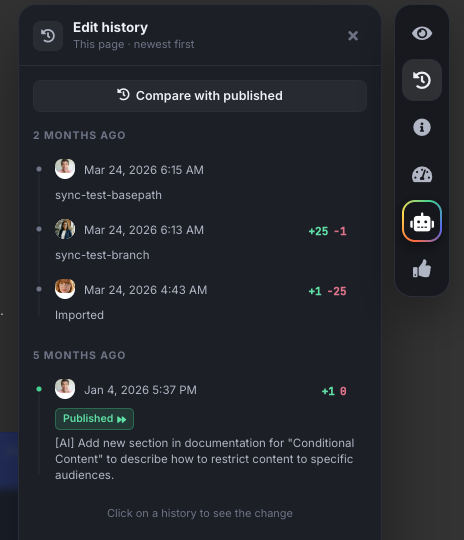
View and Revert Edit History
To view edit history of a page:
Select the page from the index.
Select Edit history from the right sidebar.
Each edit will be shown in chronological order, newest (or current) first, supplied with the team member who made the changes, the local time, and an "estimate" of how many lines have been added or removed.
On clicking on an edit history, the page will preview the change that was made.
You may at this stage revert to this change. This will create a new edit history.
Users upgrading to a higher tier plan will be able to access history older than what their previous plan allowed immediately.
When you clone a version, the page history of the original page will be accessible on the cloned page - even if you delete the original version.
Annotate History
To make it easier for your team to figure out the changes you made in an edit history, you may annotate (similar to adding a commit message) the change. To annotate a history:
Select the page from the index.
Select Edit history from the right sidebar.
Hover over the edit you wish to annotate, and click on the edit icon next to it.
Type in your commit message and submit it.
See Changes since Published Page
If you are currently writing a draft, and you need to review the changes since page was last published:
Select the page from the index.
Select Edit history from the right sidebar.
At the top of the panel, click Compare with published.
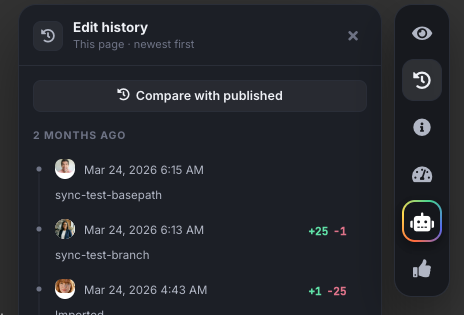
All edits since last published edit will be merged and showed.
Known Limitations & Bugs
Diffs might have extra spaces and dashes after an import.
If a block is changed, then we only highlight it in orange and we do not show the previous state. The new state is only shown.