
Centro de soporte
v1.0
Español
Google Analytics
Herramientas de IA
Summarize Page
Copy Markdown
Open in ChatGPT
Open in Claude
Connect to Cursor
Connect to VS Code
Los usuarios del plan Supercharged pueden integrar DeveloperHub con Google Analytics para hacer un seguimiento de las visualizaciones de página. Puedes usar IDs tanto de Universal Analytics como de Google Analytics 4.
Configuración de Google Analytics
Abre Project Settings → Integrations.
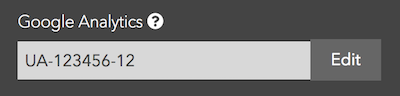
Ya deberías tener configurada una propiedad para el subdominio de la documentación en Google Analytics.
Pega el código de seguimiento de Google Analytics. Los IDs de Universal Analytics tienen un formato como
UA-XXXXXX-YY. Los IDs de Google Analytics 4 tienen un formato comoG-XXXXXXXX.Introdúcelo en el campo de entrada y guarda.
Enhorabuena
Ahora puedes hacer un seguimiento de las visualizaciones de página en Google Analytics.
Última actualización el May 21, 2026
Anything missing? Leave us feedback
Need help? Visit our community forums or contact us.
Discard Changes
Do you want to discard your current changes and overwrite with the template?
Archive Synced Block
Message
Create new Template
What is this template's title?
Delete Template
Message
Primeros pasos
Publicación y alojamiento
Búsqueda y analíticas
Page
Code Steps
Category
Label
Link
Separator
Title
Message
Page icon
No icon. This page keeps the plain index row.
orSVG or PNG, square, at least 32×32.
Create new category
What is the title of your new category?
Edit page index title
What is the title of the page index?
Edit category
What is the new title of your category?
Edit link
What is the new title and URL of your link?

