 Made in DeveloperHub

What is the value of documentation that lacks the essential information your readers require? Search analytics serve as critical indicators, helping you determine whether your documentation effectively meets its intended purpose. By analysing these insights, you can make informed decisions to enhance your content, ensuring that it aligns with the needs of your audience.
What is in Search Analytics?
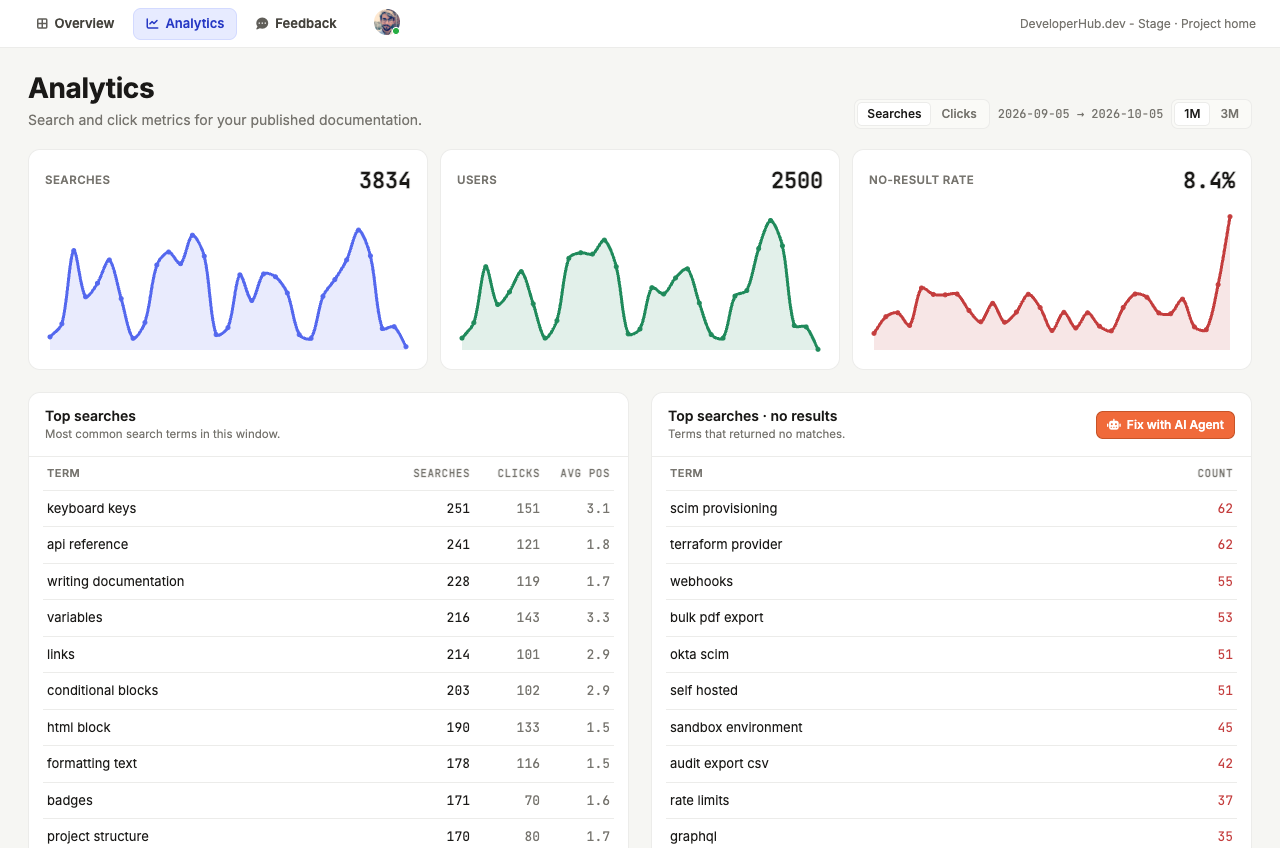
We gather information about how your readers use the lightning-fast search, and we crunch the numbers for you. Here is what you can find here:
The count of searches.
The count of search users.
The rate of searches that resulted in no hits.
The top terms used for searches, with their click count and average position when clicked.
The top terms that resulted in no hits.
The count of clicks.
The average position of search clicks.
The no click rate.
The top searches that resulted in no clicks.
Use Searches / Clicks at the top to switch between search and click metrics, and 1M / 3M to view the past month or 3 months.
Next to the top terms with no results, Fix with AI Agent opens the AI Agent with those terms, ready for you to send, so it can write the content your readers are missing.
Where is Search Analytics?
You can find your Search Analytics in your Dashboard. In the editor top navigation, open the scope picker, choose Dashboard, then open the Analytics tab.
Troubleshooting Analytics
Analytics not Showing
If you are getting an error while loading analytics, it could be because of adblockers which are blocking the requests to get analytics from our third-party search partner. Please disable adblockers when using our site to resolve the issue.