 Made in DeveloperHub

AI Agent turns a conversation into proposed edits across your documentation. Ask for a change and it reads your content, works out everything the change touches, and stages the edits for you to review.
A single request can change many pages at once. It also works on API references and changelog posts, not just pages.
Nothing AI Agent does is written to your documentation on its own. Every change is staged, you review it line by line, and nothing reaches your readers until you save it.
Who can use AI Agent
AI Agent needs a plan that includes AI features, and an admin has to switch it on:
Open Project Settings → AI → AI Agents & MCP.
On the Editor tab, under Writing, turn on AI in the editor.
Click Save changes in the top menu.
AI in the editor is the master switch for every AI that works on your docs, so it also turns on AI Writing Tools and the agent that fixes and edits your OpenAPI spec. Off means no editor AI at all.
Writers and above can then use it. Saving and publishing in one step, deleting anything, and changing a page's sidebar icon all need the publisher role, so a writer may be able to edit something they cannot remove.
Reviewers get a read-only view instead. They can open the window, read the pull request runs and go through a proposal line by line, but they cannot ask for anything, accept or reject a section, or save. See what reviewers can read.
Anyone can open the window whatever their plan. If the project has no AI features, or an admin has switched the agent off, you get a sample run showing what it does in place of the real thing, and a See plans button.
Runs are metered. Each message you send spends AI credits from the project's monthly balance, shown as a pill in the window's top bar.
Opening AI Agent
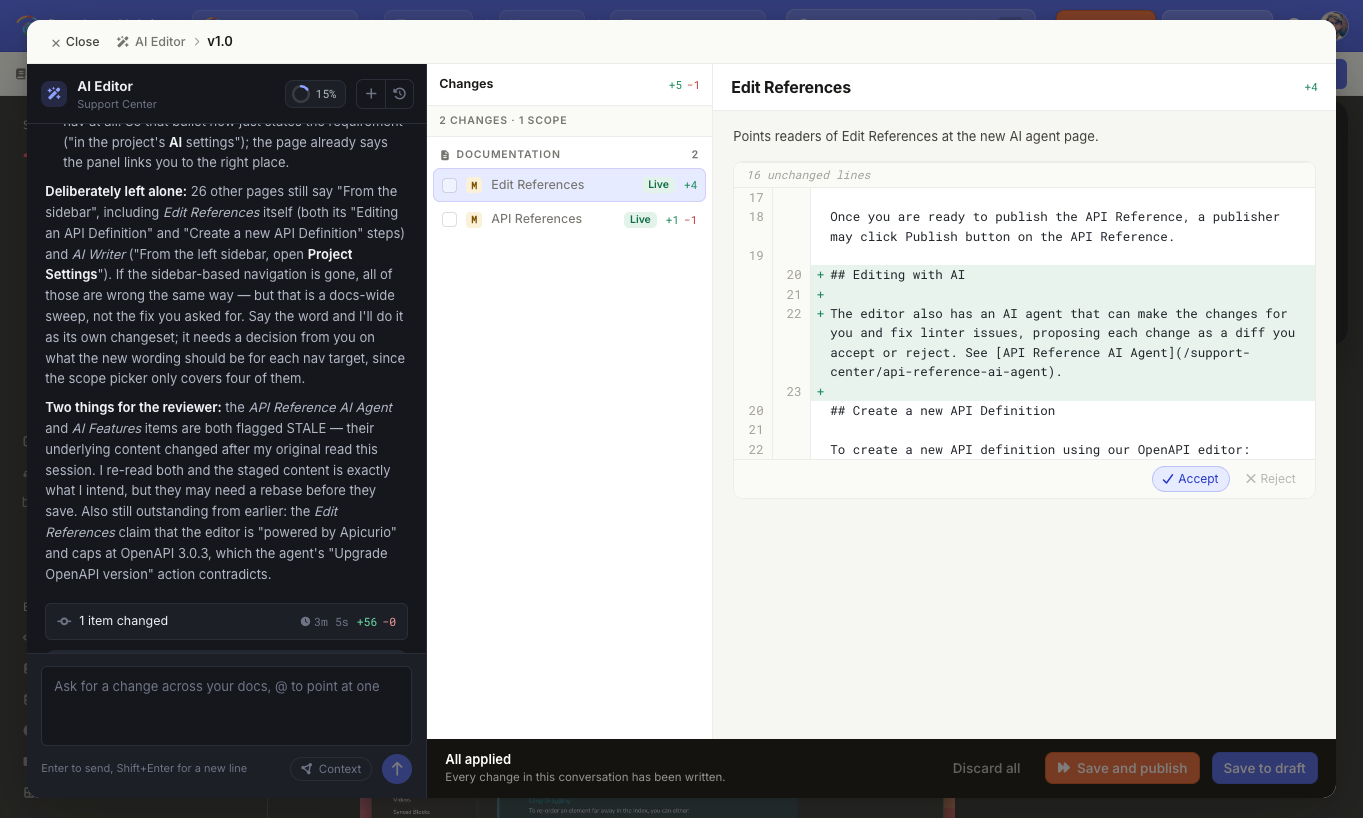
Select AI Agent in the editor's top bar. It opens as a near full-screen window headed AI Editor, with the conversation on the left and the review panes on the right.
Closing the window does not stop a run. The agent carries on working while you go and look at the pages it is changing, and the top bar button keeps pulsing until it finishes. To end a run early, use Stop.
Reopening it puts you back in the conversation you left, staged changes and all, including a turn that is still running. A conversation still working is tagged Running in the earlier conversations list.
You only start somewhere new when the last one is genuinely done: everything in it saved or discarded, nothing running, nothing half-typed, and an hour since you last touched it. Then the button opens a fresh conversation and files the old one under earlier conversations.
Asking for a change
The agent works across the documentation version you are in, including drafts and unpublished pages. Ask in your own words, and describe the outcome you want rather than the steps to get there.
A new conversation offers a few examples to start from. Select one to fill the message box with it, then send it as it is or edit it first.
Examples
Fixing what is broken
Fix all the broken links in this version. It checks every page in one pass rather than page by page, repoints the links it can resolve, and reports two pages sharing a slug as something for you to rename rather than renaming one itself.
Rename the legacy_token parameter to api_token everywhere it appears. Pages, API references and changelog posts in the same run, so the spec does not keep the old name after the prose has moved on.
Find the reader searches that returned nothing, and fix the pages that should have answered. It reads search analytics itself, then separates the terms that need a page written from the ones where the page exists under wording no reader guesses.
Keeping the docs level with the product
These need a code repository attached:
Check the last commits and update the docs. It reads the commits, works out which of them change anything a reader would notice, and edits only the pages that are behind. Refactors, dependency bumps and internal tooling are left alone.
Find stale pages and check whether they need updating. It compares what the pages claim against the source, and where the two disagree it says which of them it thinks is out of date and names the file it read.
Write a changelog post covering what shipped in v3. It reads your recent posts first and follows how they are written, and keeps the post to what a customer can now do.
Reshaping what is there
Rewrite all the pages under Installation and restructure them. Several rewrites, a page split out of one of them, and the order they sit in, all in one proposal.
Add a "Rate limits" section to every endpoint page that does not have one.
Turn the last three sections of this page into a page of their own, and put it directly after this one.
The sidebar
Add icons to all pages. It chooses an icon per page from the page's title and leaves the pages that already have one. This needs the publisher role.
Add a "Guides" category above the tutorials. It can add categories, links, labels and separators. Grouping existing pages under a new category takes two goes: save the category first, as nothing can be moved into an item that so far exists only as a proposal.
An edit is not the only acceptable answer. Asked to write up a release that turns out to be refactors and test changes, it tells you there is nothing a reader would notice rather than writing it up anyway.
The agent always knows which page you have open behind the window, so "fix the broken links on this page" or "tighten this up" work without you naming anything. It follows you as you move around: what counts as "this page" is whatever is open when you send the message, not when you opened the window. An API reference works the same way. Knowing where you are does not confine the agent to that page, so a request that reaches wider still does.
Pointing at something with @
Type @ in the message box to point the agent at something specific. Mentioning is stronger than simply having a page open: it tells the agent to go and read that page before answering. You can pick:
this page: the page open behind the window.
Any page in the version.
An API reference.
A file from a code repository, if one is attached.
Deleting the label from your message removes the mention again.
What the agent can read
Beyond your pages, AI Agent can look at search analytics to find the terms readers searched for and found nothing for, read the feedback readers left on your pages, ratings and written comments alike, check every link in a version at once, and list the pages that link to a page before it changes it.
Stopping a run
Stop takes the place of the send arrow while a turn is running.
Everything the run had staged by then is kept for you to review, and it still spends the AI credits it used getting that far.
Reviewing what it staged
Proposed changes collect in the Changes list, grouped under Documentation, API references and Changelog. Each row shows what it would add and remove.
You have two levels of control:
A whole change: the tick box decides whether a change is included in the next save. Untick anything you do not want. Selecting Drop this change removes it from the list entirely.
Part of a change: open a change to see it line by line, then use Accept or Reject on each edited section. A rejected section is marked Won't be saved, and the rest of the change still applies.
Rows can carry a tag that explains their state:
Tag | What it means |
|---|---|
Saved | Already written to the page as a draft. |
Live | Already published. |
Blocked | Cannot be saved as it stands. Ask the agent to redo it. |
Changed since | The page changed after the agent read it, so the proposal no longer fits. Ask the agent to look at that page again, or drop the change. |
Not saved | The save was attempted and did not succeed. |
When you are happy, use the bar at the bottom:
Save to draft puts the selected changes into draft mode, where you can edit further before publishing.
Save and publish writes and publishes them in one step. This needs the publisher role.
Discard all throws the staged changes away.
Saving does not end the conversation. Saved changes stay in the list, and you can keep asking for more.
Deletions and page settings changes (a page's slug, title, search keywords, sidebar icon or position) are not drafted. They take effect the moment you save, with either button.
Links to a renamed page from inside your documentation are repointed for you, but links from anywhere else, such as bookmarks, emails and search results, will stop working. A deletion cannot be undone.
Changelog posts have no draft either: Save and publish makes a post public immediately, and Save to draft leaves it unpublished for someone to release later.
Conversations
Each conversation keeps its own thread and its own staged changes.
Select to start a new conversation. The current one is closed, not deleted.
Select to reopen an earlier conversation. Opening one keeps the other, and nothing staged is lost either way.
The same list has a Pull requests section, holding the runs that started from a pull request on an attached code repository. You can read those and reply to them, but they stay with the pull request rather than becoming one of your own conversations.
What reviewers can read
Reviewers see the Pull requests section and nothing else in that list. Other people's conversations stay private to them, and a reviewer's own list is empty until the agent proposes something for a pull request.
A reviewer can open a run and read every proposed change line by line. They cannot send a message, accept or reject a section, drop a change, or save. A note above the message box says so.
This is what makes the review link in a pull request useful to a wider group: anyone on the project from reviewer upwards can follow it and read the proposal, while acting on it still needs a writer.
Keeping a conversation sharp
A dial at the top of the conversation shows how full it is as a percentage. Past 75% the agent suggests starting a new conversation, and past 90% it asks you to confirm before sending. Starting a new conversation never loses what is already staged.
The Context button next to the message box shows what the agent is working from:
Row | What it shows |
|---|---|
Viewing | The page or API reference open behind the window. It disappears when nothing is open. |
Editing | The version the agent is writing to. |
Reading | The code repositories it can read, or a note that none are attached. |
It also warns you when an attached repository cannot be read or has not been read for a while.
Remembered rules
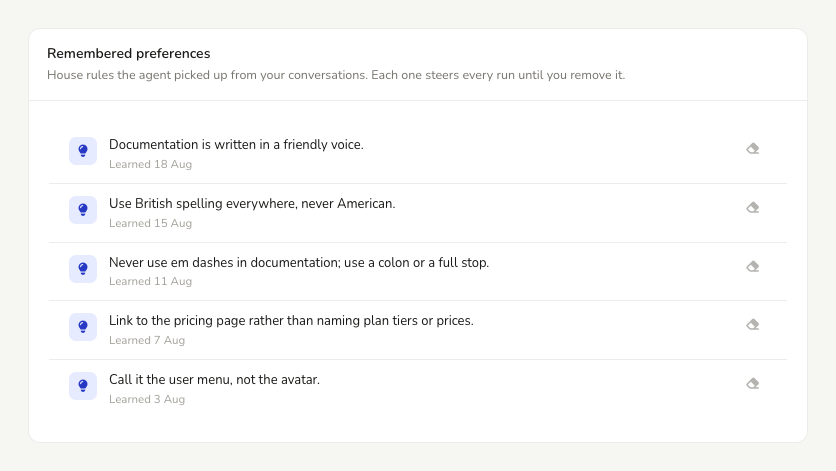
Tell the agent something to always do or never do, such as always using British spelling, never writing a page from a particular directory, or which section to leave alone, and it records the rule for the project. The conversation shows what it took down, marked Remembered for this project.
A remembered rule applies to everyone working on the project, on every run, including the runs a pull request starts.
Ask the agent to drop a rule and it does. You can also select Forget on the row that recorded it, and admins can see every rule together, and remove any, under Project Settings → AI → AI Agents & MCP → Editor tab, in the Remembered rules card. Forgetting is final, so recording it again is the only way back.
A project holds up to 25 rules of 120 characters each.
The agent follows the rules it has been given, but nothing enforces them. A rule such as never changing a particular section steers every run; it is not access control. Use roles for that.
Choosing the model
Admins can pick the model every agent run in the project uses, including the pull request checks under Self-Updating Docs. Open Project Settings → AI → AI Agents & MCP → Editor tab, and use Agent model in the Model card.
Each model is rated out of three for Cost, Speed and Judgement, and shows who makes it and the country it comes from, so you can rule out a model by its origin if you need to. Auto follows our current recommendation and moves with it.
The model a run uses is shown at the top of the AI Editor, beside your AI credits balance. Admins can select it to open the setting.
What AI Agent cannot do
It cannot create an API reference. That means uploading a definition yourself.
It cannot delete a page that has pages nested under it, the only page left in a documentation section, or the last section in a version.
It cannot move a page to a different documentation section, or rename and reorder the sections themselves.
It can add a category, link, label or separator to the sidebar, but it cannot rename, move or remove one once it is there.
It cannot clear a page completely. Emptying a page is not the same as deleting it, so the agent refuses and points you at deleting it properly instead.
It cannot generate images.
It cannot change your code. Attached repositories are read only.
If a request needs one of these, the agent says so and does the part it can rather than approximating the rest.
AI Agent and AI Writing Tools
AI Writing Tools work inline on text you have highlighted and apply their changes straight away. AI Agent works from a conversation, can change many pages, API references and changelog posts at once, and stages everything for review first.
Activity log
Applying changes is recorded in the activity log as published AI changes or saved AI changes as drafts, once per save rather than once per page. Changing the agent model is logged too.
What data is sent
The pages, API references and changelog posts the agent reads and edits are sent to the model you have chosen, along with your conversation.
Agent runs are served through OpenRouter, and only providers with zero data retention are used. Your content is never kept and never used to train a model. See AI Features for how this differs from our other AI features.