 Made in DeveloperHub

Attach your source code to a project and AI Agent can check what your documentation claims against what your code actually does. It can also watch your pull requests and draft the documentation changes each one implies.
The agent only ever reads your code. It never writes to a repository, commits, or opens pull requests.
This video walks through the whole thing: setting it up, the agent starting when a pull request is opened, the changes it stages, asking it for a changelog post, then saving and publishing the result.
Before you start
Connect GitHub. Open Project Settings → Developers → Integrations and connect GitHub, then grant the DeveloperHub GitHub App access to the repositories you want to attach. You do not need to be using GitHub Sync for your documentation. The connection is the only prerequisite.
Attaching needs an admin. Only admins can open these settings, although anyone on the project can be picked to be told when a check finishes.
Runs need a plan with AI features, and credits. You can attach repositories on any plan, but nothing will run until the project is on one and has AI credits to spend.
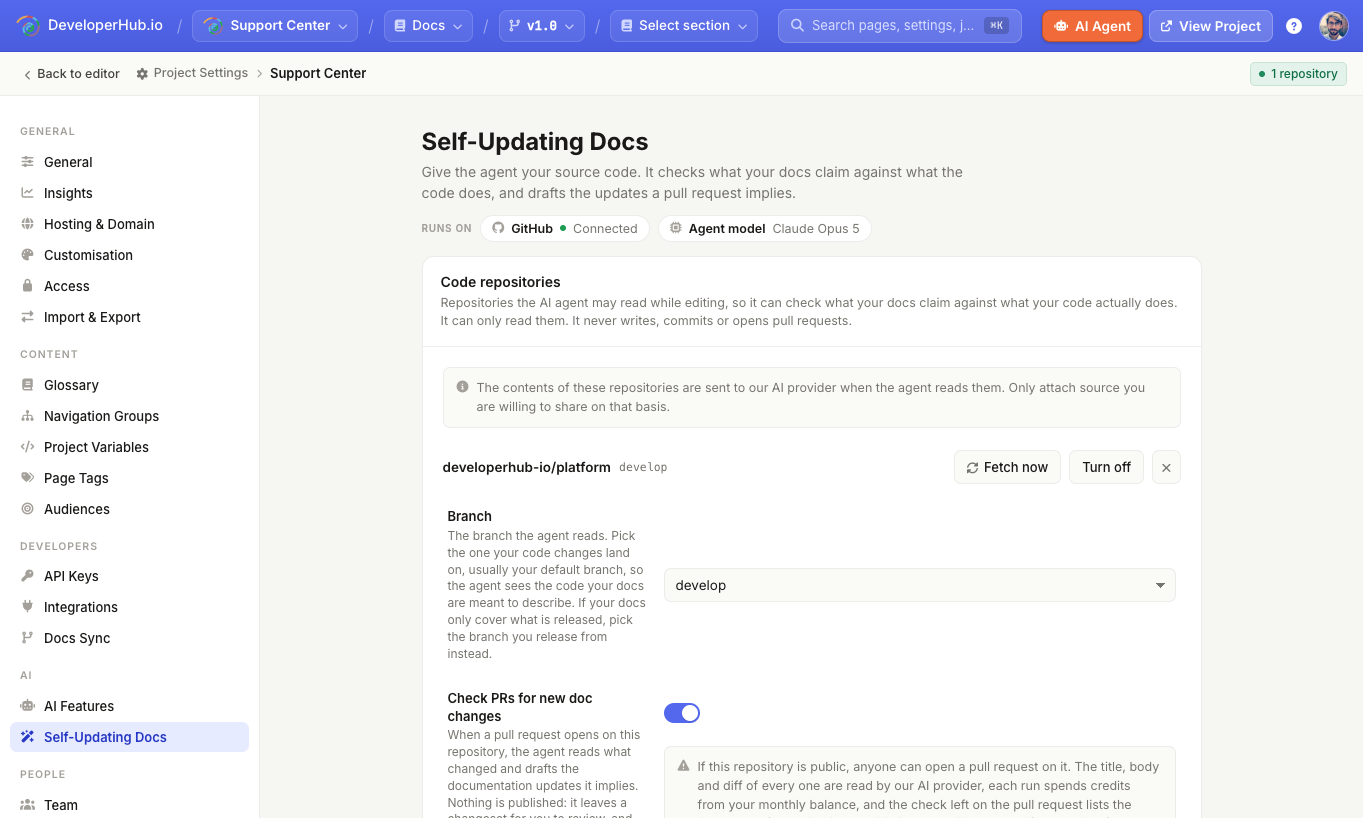
Attaching a repository
Open Project Settings → AI → Self-Updating Docs, then in the Code repositories card:
Under Add a repository, pick a repository from the list. Only repositories the DeveloperHub GitHub App can already see appear here, and your documentation repository is excluded because it is already synced.
Click Add repository.
DeveloperHub fetches a copy of the repository and reads it to write an agent guide for you. You can leave the page while it works.
If the fetch fails, the repository stays attached and tells you why, so you can fix it and use Fetch now rather than adding it again.
The contents of these repositories are sent to our AI provider when the agent reads them. Only attach source you are willing to share on that basis.
Branch
Each repository is read from one branch, shown in the Branch row. It starts on your repository's own default branch.
Change it if that is not the branch you want read. Pick the one your code changes land on, so the agent sees the code your documentation is meant to describe. If your documentation only covers what is released, pick the branch you release from instead.
The branch you choose applies to the whole project. If you document several versions, they all read that one branch.
The agent guide
The Agent guide describes what the repository is and which directory holds what. It is the single thing that most affects how well the agent works: with a good one it goes straight to the right place, so runs finish faster and answer more accurately.
DeveloperHub writes a first guide for you when you attach a repository. You can edit it by hand at any time, or use Rewrite it for me to have it read the repository and write a new one. Rewriting replaces whatever is in the box.
Keeping the copy fresh
The copy of your repository refreshes on its own as the agent works. You can also refresh it yourself with Fetch now, and leave the page while it works. If a fetch fails, the row shows the reason.
If a repository has not been read for more than a week, the row shows how old the copy is. That is worth watching, because an out-of-date copy can lead the agent to confidently correct a page that was already right.
Checking pull requests
Turn on Check PRs for new doc changes on a repository and the agent reads each new pull request on it, works out whether your documentation needs to change, and stages the changes for review.
Nothing is published. The run leaves the proposed changes in AI Agent for someone to review, exactly like a change you asked for yourself.
A run starts when a pull request is opened, reopened, marked ready for review, or updated with new commits. The agent reports back on the pull request as a check called DeveloperHub docs. The check is never a pass or a fail and never blocks a merge: it says either that no documentation change is needed, or how many changes were proposed and where to review them.
To review what a run staged, open AI Agent and select the run from the Pull requests section of the earlier conversations list. The check links straight there from the moment the run starts, so following it from the pull request lands you on the right run, and you can follow along while the agent is still reading. You can reply to a run to ask for more, but you cannot take it over as your own conversation, and you cannot reply while it is still working. A run in progress can be stopped, and anything it staged before you stopped it is kept.
Reviewers can read these runs too, line by line, without being able to reply or save. Everyone else on the pull request needs a DeveloperHub account on the project: the link is not public, and it does not expire.
Checks spend AI credits from the same balance as the conversations your team starts, so a project with none left runs no checks until it renews or tops up.
If a repository is public, anyone can open a pull request on it. The title, description and code changes of every one are read by our AI provider, and the check left on the pull request names the documentation pages that would change and how much each one gains or loses. All of that is visible to anyone who can see the repository.
Each repository can run at most 20 checks a day, and says so on the pull request once it is reached. The limit resets at midnight UTC, and pushing again before then will not start a check.
Telling people about a run
Use Notify when a check finishes to pick who gets an email. Only people on the project can be picked, and only runs that actually propose a change send anything, so a pull request that needed no documentation update is silent. The reviewers on the pull request are not told.
What the agent does with your code
It can list and search files, find where a class or function is defined, read them, read your commit history, and read the difference between commits. Everything it reads in one conversation comes from a single commit, so its answers stay consistent while you work, and you can ask it to pull the latest code when you have pushed something new.
The agent treats your code as evidence for what your documentation claims, not as something to copy out. It tells you when a page and the code disagree rather than copying your source into new reference pages. Anything it reads is treated as material to work on, so instructions written inside a file are reported to you rather than followed.
Common credential files, such as .env files, private keys and cloud credentials, are never read by the agent.
Limits
A repository must be under 250 MB. Contact Us if you need higher limits.
Individual files above 1 MB are not copied, so the agent works from the smaller files around them.
Only the first attached repository is searched when you point at a code file with
@in AI Agent.
If you disconnect GitHub
Disconnecting GitHub removes every attached code repository along with its branch, agent guide, pull request setting and notification list, and deletes the copies DeveloperHub holds. Files in your own repositories are untouched.