 Made in DeveloperHub
An intelligent assistant that helps readers find answers through natural conversation. This feature uses OpenAI GPT models to provide contextual answers about your documentation and API endpoints.
Formerly called AI Search.
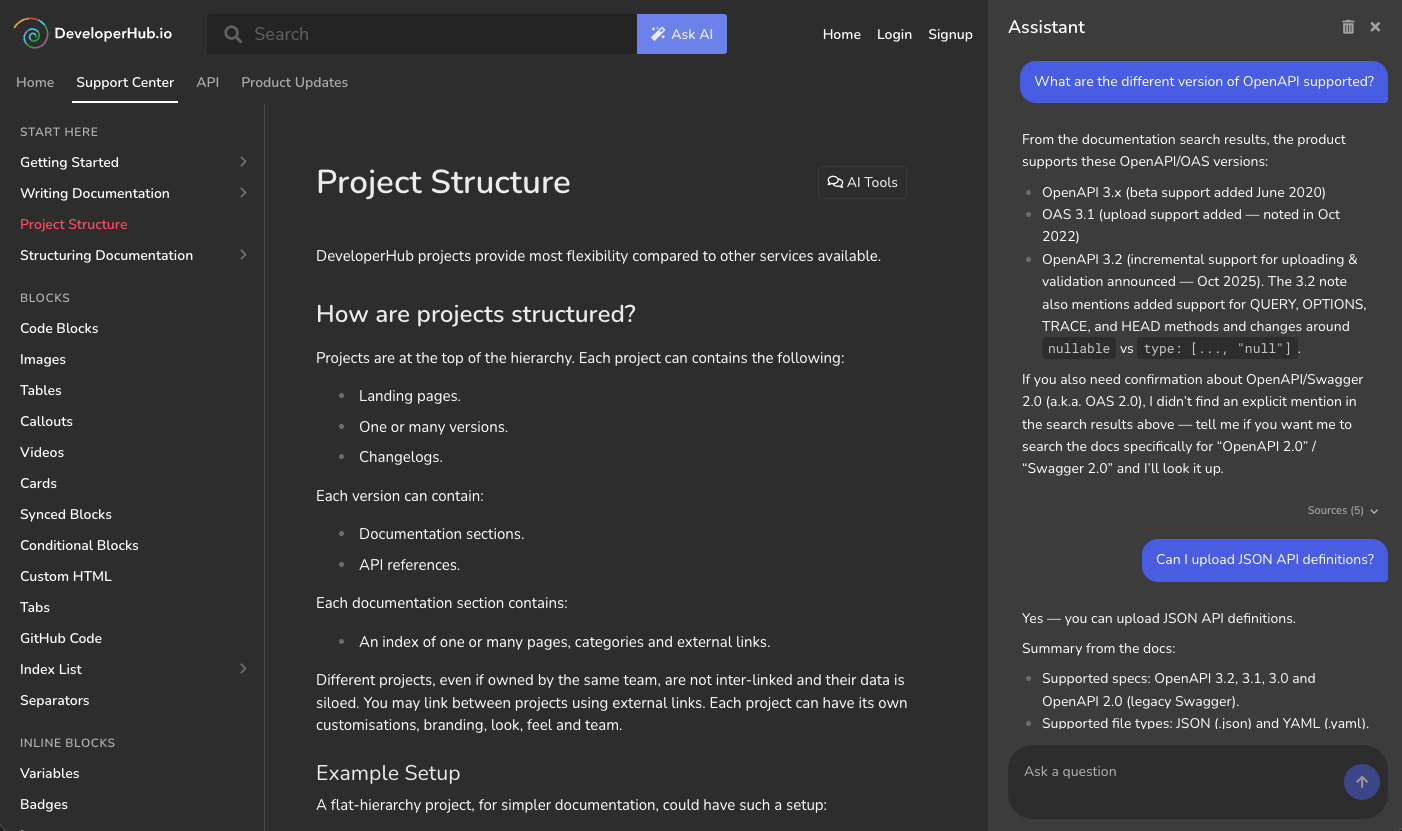
AI Assistant Features
AI Assistant allows the readers to ask a questions about the docs and API endpoints, delivering GPT-powered responses. Features of AI Assistant:
Answers from both documentation and API references.
Can ask questions in any language, regardless if the documentation is written using that language or not.
Responds using the language of the question.
Provides a source list for further reading.
Links the pages an answer draws on, so a reader can open one without leaving the conversation.
Answers from the documentation each reader can see, including audience-gated content once the reader is identified.
The reader can ask follow up questions.
AI Assistant Experience
When AI Assistant is enabled, an Ask AI button appears next to the search bar. Clicking this button opens an assistant sidebar on the right side of the screen.
The assistant provides a conversational interface where readers can:
Ask questions about the current page they're viewing.
Ask questions about the documentation in general.
Ask questions about specific API endpoints.
Engage in follow-up conversations to clarify or expand on answers.
The assistant responds with detailed explanations and examples when possible, and provides source references for further reading.
Enabling AI Assistant
AI Assistant needs a plan that includes it. To enable or disable it:
Open Project Settings → AI → AI Agents & MCP, then the Readers tab.
Under AI Assistant, turn AI Assistant on or off.
Click Save changes in the top menu.
Once AI Assistant is enabled, it might take a couple of minutes until it is useable.
If your project is not on a plan that includes AI Assistant, the switch stays inactive and the card tells you which plans do. Should your project later move to a plan without it, AI Assistant and its MCP server are switched off and your documentation stops being indexed. Switching AI Assistant off is always allowed, whatever your plan.
Search Update Frequency
New or deleted content would be effectively available within 30 minutes for AI Assistant.
Validating Responses
To validate responses provided by AI Assistant, a log of all questions and answers can be downloaded.
To download the log:
Open Project Settings → AI → AI Agents & MCP, then the Readers tab.
Next to Download AI Assistant logs, select the duration to download the logs for.
The logs contain a UID which is an anonymous identifier of the user. It can help understand the different questions a user has asked.
Limitations of AI Assistant
Prone to provide incorrect, misleading or incomplete answers.
No analytics are collected yet.
AI Assistant only works on Next UI.
What Data Is Sent to the LLM?
When enabling AI Assistant for a project, the entirety of the content that readers can access is sent to the LLM. Whenever content is re-indexed, the new content would be sent to the LLM.